




Budgeting Tools for Freelancers: Managing Irregular Income
Freelancers and gig workers worldwide face the feast-or-famine cycle of unpredictable pay. By definition, irregular (variable) income means your earnings “can change a lot from month to month,” whether you’re in New York, New Delhi, or Nairobi.
This unpredictability makes budgeting uniquely challenging. In one guide, freelancers describe irregular cash flow as feeling “like a nightmare” – one month is flush and the next, paying bills is hard.
To thrive, self-employed professionals need disciplined money management. This guide covers self-employed budgeting tips and the best budgeting tools for freelancers, with a mix of authority and practical advice. We’ll explain why budgeting is hard for freelancers, step-by-step budgeting strategies (applicable globally and in the US), and review top apps that make tracking variable income easier.
Why Budgeting Is Hard for Freelancers
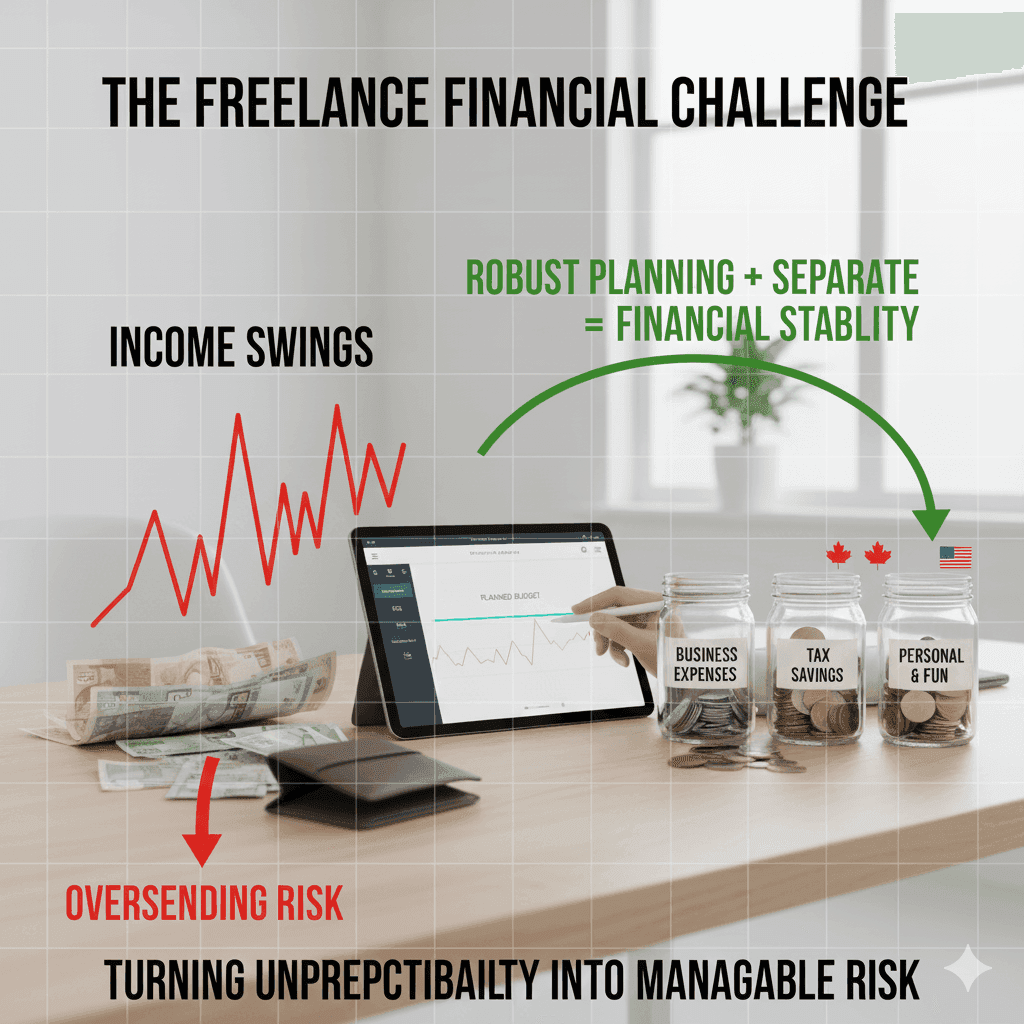
For traditional employees, a set paycheck arrives on schedule. Freelancers don’t have that safety net. Income swings – winning a big project one month or seeing clients pay late in another – create planning headaches.
Without a fixed paycheck, it’s easy to overspend during good months and then scramble in lean periods. According to financial experts, this inherent volatility means “robust budgeting” is essential: the right tools don’t just track numbers – they give insights so you can plan spending, savings and even vacations with confidence.
Freelancers worldwide report similar struggles. For example, a Canadian financial blog notes that irregular income “often leads to stress or overspending during lean months,” underlining the need for a flexible budget.In the US, many freelancers cope by opening multiple FDIC-insured accounts (e.g. separate checking/savings accounts) to segment funds. This “adds an extra layer of financial security” and helps avoid mixing personal and business cash.Separating accounts is one basic tip for anyone in the gig economy. The challenge of freelance budgeting is universal, but a disciplined approach and the right tools turn unpredictability into manageable risk
“If you’re looking for practical ways to earn online without paying anything upfront, our latest guide has you covered. In this article, we break down seven beginner-friendly methods that can help you pull $500+ monthly with real platforms and zero investment. Each strategy is easy to start, scalable, and perfect for freelancers, students, or anyone building a side income. Check out the full guide here: https://lumechronos.com/7-simple-methods-to-make-money/ and start leveling up your earning game.”
Key Budgeting Strategies for Freelancers
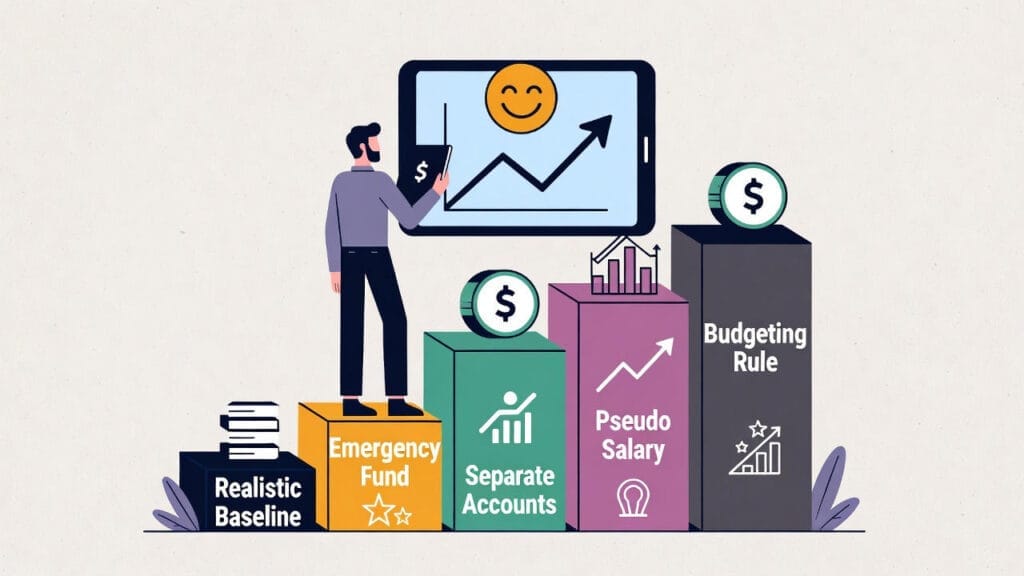
To tame irregular cash flow, start with solid financial foundations. Experts recommend these key strategies.
- Calculate a Realistic Baseline: First, figure your average monthly income. Sum your earnings from the past 6–12 months (all jobs, gigs, side hustles), then divide by the number of months. This gives a baseline to budget around. For example, if your total income last year was $60,000, your baseline is $5,000/month. Using your lowest-earning month as the base (instead of the average) provides extra safety. This baseline smooths out spikes and dips so you can plan fixed expenses and savings.
- Prioritize Essentials: Cover fixed costs first – rent/mortgage, utilities, insurance, loan payments, child care, etc.. These are non-negotiable bills. For instance, Upwork’s finance guide emphasizes listing must-pay expenses (housing, bills, debt minimums) before anything else. Once these are locked in, any leftover can go to savings or variable costs. (One tip: allocate a large portion of each paycheck to these essentials immediately; treat them like a fixed expense so you don’t inadvertently spend it elsewhere.)
- Build an Emergency Fund: Aim to save 3–6 months of living expenses in a separate savings account. This becomes your financial cushion for lean months. Treat your emergency fund as a “non-negotiable” line item. Set up automatic transfers: for example, dedicate 10–20% of every payment you receive into this fund. Over time, you’ll accumulate a buffer that protects you during dry spells. (One expert notes that for irregular earners, “an emergency fund is not a luxury – it’s a survival necessity”.)
- Separate Business and Personal Finances: Keep your freelance revenue in a dedicated business bank account, separate from your personal checking. Then split again into spending, saving, and tax accounts. This clarifies cash flow and simplifies taxes. Financial advisors often recommend multiple bank accounts: e.g. one for daily expenses, one for taxes, one for savings. Having separate accounts helps prevent accidentally spending business funds and “creates clarity around where your money goes”. In the US, using multiple FDIC-insured accounts can further safeguard funds
- Pay Yourself a (Pseudo) Salary: Decide on a fixed monthly “paycheck” for yourself, based on your baseline. For example, if your average is $5,000/month but you want stability, you might transfer $4,000 each month to your personal account regardless of what you actually earn. Any extra income can go into savings or grow your business. This salary model creates consistency: it forces you to live on that number, not on feast-month highs. (Transfi’s guide suggests exactly this “bonus salary” tactic, cushioning personal budgets from wild swings.)
- Follow a Budgeting Rule: Apply a budgeting framework to each month’s income. Classic advice is the 50/30/20 rule: roughly 50% to essentials, 30% to business/spending, 20% to savings/investments. A specialized freelancer version might look like 50% essentials, 30% business expenses (tools, marketing, education), and 20% reserves/investment. Similarly, Upwork’s guide recommends a 70/20/10 split: 70% of income for essentials, 20% to savings, 10% discretionary or buffer. Either way, the goal is to pre-assign every dollar: you know exactly what’s covered and what must be saved. This prevents overspending when income is high and provides a plan for low months.
- Track Every Dollar: Rigorously record all income and expenses, no matter how small. This builds awareness of where your money goes. Use a simple app or spreadsheet to categorize spending (food, travel, software, etc.) each month. One freelancer guide suggests, “Observing income and expense patterns leads to understanding budget-making anchors: average recurring cash outflows and inflows”
- Well-organized tracking also makes tax time easier. For example, Upwork advises keeping detailed records of earnings, invoices and receipts, either via bookkeeping software or a trusted accountant, to make planning and tax payments stress-free.
By combining these steps – baseline income, emergency fund, separated accounts, and diligent tracking – you create a resilient budgeting system. You turn the chaos of gig earnings into predictability.
Top Budgeting Apps and Tools
Thankfully, many apps and software are designed to help freelancers budget. These tools range from simple trackers to full financial suites. Below are some of the most popular options (global and US-focused) that freelancers use to manage variable cash flow:
- Mint (Free – US & Global): A user-friendly, free budgeting app where you can link bank and credit accounts. Mint automatically categorizes spending and alerts you to upcoming bills and unusual trends. It’s great for beginners because it provides a clear visual dashboard of your finances. Many users appreciate that Mint “sends alerts for bill payments and spending trends,” helping you stay on track.
- YNAB – You Need A Budget (Paid, ~$84/year – Global): A popular envelope-style budgeting tool. YNAB forces you to allocate every dollar of income to a category (savings, bills, fun, etc.) so you always know where your money is going. It is designed for variable income: one feature is that it encourages you to “budget based on your income,” giving each dollar a job. In practice, freelancers use YNAB to plan ahead – for instance, assigning windfalls to taxes or future bills. Its proactive approach can teach strong budgeting habits, even if it has an annual cost. (One guide notes YNAB is “ideal for freelancers who want to plan ahead”.)
- QuickBooks Self-Employed (Paid, ~$15/mo – US/Global): An accounting suite tailored for freelancers. It connects to your bank, tracks income and expenses, and even logs mileage from your phone. A key advantage is tax planning: QBSE estimates quarterly taxes and reminds you how much to set aside, so freelancing taxes aren’t a surprise. Many serious freelancers invest in it for the convenience of automating invoicing and bookkeeping. (If you have international clients, Transfi recommends tools like this plus options like Bizpay for faster payments.)
- Wave (Free – US/Canada): A free accounting and invoicing platform that also offers basic budgeting capabilities. You can send invoices, accept payments, and then easily track that income. It’s less focused on envelope budgeting and more on full bookkeeping, but many use it in tandem with a budgeting app.
- PocketGuard (Free/Paid – US): A simple money management app that shows how much “disposable” income you have left after accounting for bills and savings. You connect your accounts and set aside amounts for recurring expenses; PocketGuard then calculates what’s left. Freelancers like PocketGuard for its clear breakdown of what you can spend each month.
- Credit Karma (Free – US/Canada): Primarily known for free credit scores, Credit Karma also automatically tracks your bank transactions and spending habits across accounts. While not a full budgeting app, many freelancers use its insights to stay aware of their cash flow and spot any irregularities early.
- Goodbudget (Free/Paid – Global): A digital take on the “envelope” budgeting system. You set up envelopes (categories) and manually allocate funds to each. It’s more manual but simple. Goodbudget was explicitly recommended in a budgeting tools FAQ as an app that “allows flexibility in tracking income and expenses” for freelancers.
- Money Manager / Walnut (Free/Paid – India): For Indian freelancers, apps like Walnut or Money Manager focus on auto-categorizing rupee expenses and tracking bills. They link to local bank accounts and can send spending alerts in Indian rupees. These regional apps help Indian self-employed users handle variable incomes in their own currency.
- Notion / Google Sheets / Excel: For “hands-on” freelancers, a custom spreadsheet or Notion database can be very powerful. You can build your own templates – e.g. a Google Sheet that tracks monthly income, categories, and graphs your cash flow. The upside is total flexibility. (Transfi’s guide even lists Notion/Sheets as adaptable tools for freelancers.) Many use an envelope template or zero-based budgeting template in Sheets. The downside is you must update it manually. But it works globally and is free.
- Specialty Tools: There are also niche solutions. For example, Bizpay (by Transfi) helps freelancers receive international client payments more predictably (no extra fees or delays). Scripbox /Groww are Indian apps that set pre-defined investment “buckets,” automating how much to save/invest each month. While not pure budgeting apps, they tie into budgeting by making savings automatic.
Each tool has its strengths. Mint and Pocket Guard shine for ease-of-use, YNAB for strict budgeting discipline, and QuickBooks/Wave for integrated accounting. As one freelancer blog notes, whether you use “Mint, YNAB, or QuickBooks, each offers unique benefits” to simplify your budgeting process..
Step-by-Step Budgeting Guide
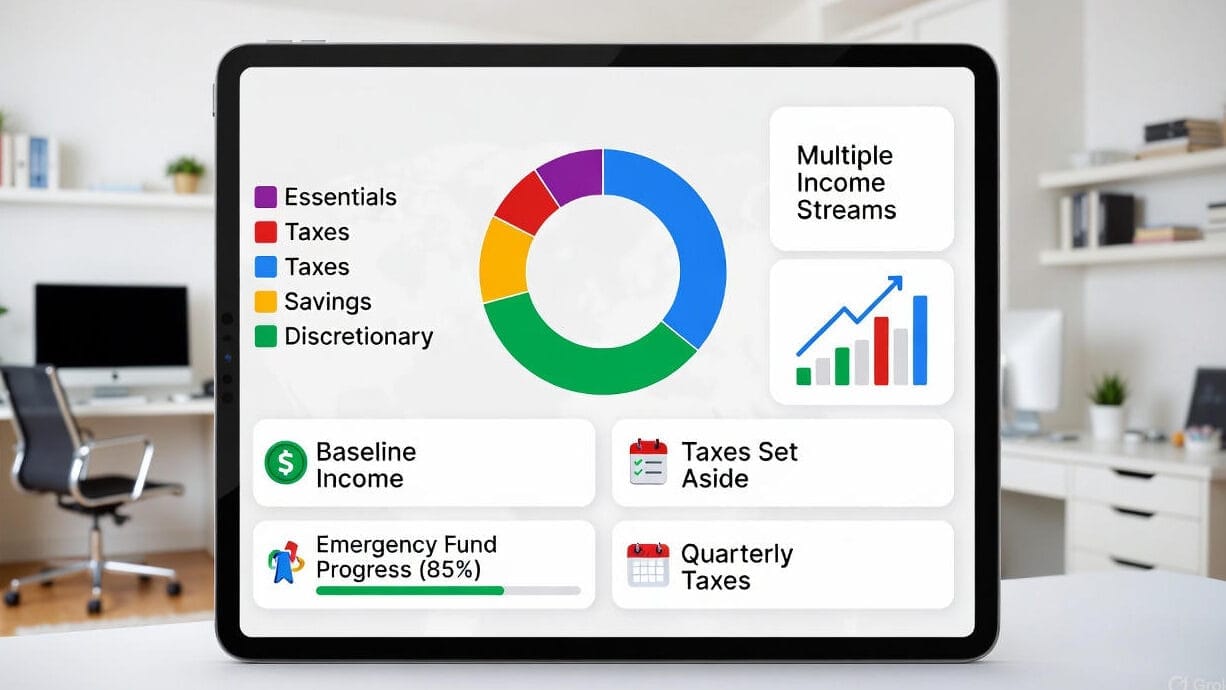
Putting it all together, here’s a numbered step-by-step process to budget as a freelancer or self-employed person:
- Calculate Your Baseline Income: Total your earnings for the past 6–12 months and divide by the number of months. This is your baseline monthly income. Use the most conservative figure (e.g. the lowest-earning month) for safety. This will be the foundation of your budget each month.
- List and Prioritize Expenses: Write down all your monthly expenses and categorize them as essential (fixed) or variable. Essential items (rent, utilities, loan payments, insurance) must be paid first. Variable costs (groceries, utilities, fuel, supplies) can fluctuate. Plan to cover fixed costs out of your baseline immediately, then see what’s left for variable spending. One simple rule is the 70% rule: plan to spend 70% of your expected income on essentials and savings, keeping 30% flexible.
- Assign Money into Buckets: Now that you have categories, allocate portions of your income to each bucket. For example: X% to housing and bills, Y% to food/transportation, Z% to business reinvestment, etc. A commonly used framework is 50/30/20 (essentials/savings/discretionary) or Upwork’s 70/20/10 rule. The exact split depends on your situation. The key is that every dollar of income gets a job. Use a budgeting app or envelope system (digital or cash envelopes) to enforce these allocations.
- Build Your Emergency Fund: Each month, put a set amount (e.g. 10–20% of income) into a separate savings account for emergencies. Treat this transfer like a fixed expense. If you have a very good month, move even more into savings. The goal is to reach at least 3–6 months’ worth of basic expenses saved. This fund ensures that if a month falls short, you can cover costs without debt.
- Automate and Track: Use technology to help. Automate bill payments and savings transfers as much as possible. In your budgeting app or spreadsheet, record every source of income (project payments, side gigs) and every expense. Modern apps can even scan receipts and tag expenses with a client or project. Seeing all transactions in one place (dashboard or spreadsheet) gives you insight into spending patterns. Review this data monthly: look for leaks (subscription you don’t need, overtime on dining out, etc.) and adjust categories as needed.
- Set Aside Money for Taxes: Freelancers often owe taxes quarterly. Decide on a tax percentage (e.g. 20–30%) and move that amount into a dedicated tax account each time you’re paid.
- Budgeting tools with tax features (like QuickBooks Self-Employed) can estimate this automatically. That way, tax season won’t wreck your budget: you’ll have the cash ready for IRS or other tax payments.
- Grow Multiple Income Streams: Instead of relying on one client or gig, look for additional income sources (consulting, side projects, affiliate revenue, etc.). Having multiple streams smooths out feast-famine swings. As Transfi advises, seek retainer clients or passive income opportunities for stability. More income sources mean more ability to follow your budget comfortably.
- Review and Adjust: At the end of each month, compare your actual spending to your budget. Did you overspend in any category? Did you save enough? Use these insights to tweak next month’s allocations. Budgeting is an ongoing process. Even the best plans need adjustments when life changes (new expenses, increased rates, etc.). The most successful freelancers regularly check their budgets and adjust targets for the next month.
By following these steps, you create a flexible budget that adapts to ups and downs. Remember, the goal is long-term stability, not perfection every month. Even if you occasionally dip into savings, staying on track overall prevents crisis.
Choosing and Using the Right Budgeting Tool
With strategies in place, pick a tool that fits your style and needs:
- Flexibility vs. Simplicity: Some freelancers need rich features (project tags, integration with bank accounts) and don’t mind a learning curve. Others want something extremely simple. An expert tip: “the best tool is the one you’ll actually use consistently”. If a complex app feels overwhelming, try a simpler one or even a spreadsheet. Conversely, if you love data, a full-featured app or accounting suite might keep you engaged.
- Expense Tracking: Look for apps with easy expense input. As one guide points out, mobile apps with receipt scanning (OCR) and the ability to tag expenses by client/project are a huge time-saver. This is crucial for maximizing deductions and understanding your cash flow. If you use cash or small payments, choose an app that quickly logs those. Mint and QuickBooks, for example, let you snap receipts on your phone.
- Income Tracking: The app should let you record variable income easily. You’ll want to tag each payment (by client or project) and date it. Some tools (like PocketGuard) automatically pull income from linked accounts and label it. This visibility helps you forecast upcoming months. Always ensure your tool can handle multiple income sources without confusion.
- Tax Support: Consider whether the tool assists with taxes. QuickBooks Self-Employed and FreshBooks can estimate taxes; Mint shows your overall net income; even Google Sheets can incorporate tax calculations. At minimum, your budget should remind you to save for taxes. If you live in a country with complicated self-employment tax (like the US), a tool with tax reports can be worth it.
- Integration: Can it connect to your bank, credit cards, PayPal or invoicing software? Integration means less manual entry. For instance, Wave and QuickBooks sync with bank feeds; YNAB and Mint link to accounts; even PocketGuard pulls data from your bank. This automation cuts errors and saves time. Also check if it can export data – useful if you hire an accountant or need reports.
- Security and Accessibility: Make sure the tool is secure (bank-level encryption is a must) and that you can access it on all your devices (phone, web). Being able to check your budget on the go helps you stick to it. Many apps offer password protection or even biometric login.
- Cost: There are free and paid options. If budget is tight, start with free tools (Mint, Goodbudget, or Google Sheets). If you have a decent income, investing in a paid app (YNAB, QuickBooks, PocketGuard Premium) can pay off by saving you time.
In short, compare features side-by-side. As one financial blog advises, look at income/expense categorization, reporting capabilities, and user interface. A cluttered interface may mean you stop using it. Read reviews from other freelancers. After all, the goal is not just to record what happened, but to plan ahead and change financial habits. The right tool will become your financial “co-pilot,” guiding you to save during peaks and spend wisely during valleys
Global and US Considerations
While the above advice is broadly applicable, here are a few regional notes:
- Global Freelancers: Wherever you are, the same principles hold: calculate a baseline, save a buffer, track every payment. Currency differs, but apps like Mint and YNAB support multiple currencies. If you deal with multiple currencies, look for tools that can consolidate or report in your main currency. Many budgeting tools are globally available. For example, Transfi’s list of tools includes Indian-specific apps (Walnut, Scripbox/Groww) because they handle rupees and local investment norms. Freelancers in Europe or Asia may find local versions or use global apps with localization settings. In any country, keeping an emergency fund and separating accounts is crucial.
- United States: U.S. freelancers can take advantage of tax-optimized tools. QuickBooks Self-Employed and TurboTax Self-Employed integrate well with US tax rules. Also, FDIC insurance only applies to US banks; Upwork recommends multiple FDIC-insured accounts (for checking, savings, taxes) to keep money safe and organized. Credit Karma (free credit monitoring) is US-specific and can track your spending at US banks. Apps like PocketGuard and YNAB have strong user bases in the US.
In sum, adapt the basics to your location. The budgeting tools may vary (Mint is US/Canada only, whereas Goodbudget is global, etc.), but the strategies (baseline budgeting, emergency funds, expense tracking) are universal.
Image: A freelancer at a home office, working through budgeting paperwork and tools. Freelancers often manage their own finances from a home workspace, tracking income and expenses carefully. (Source: Kaboompics/Pexels)
Conclusion: Financial Freedom for Freelancers
Budgeting doesn’t have to be another source of stress for freelancers – with the right plan and tools, it can become your superpower. By embracing disciplined budgeting strategies (baseline income, emergency funds, savings buckets) and leveraging apps built for irregular income, you transform uncertainty into control. As one guide puts it, once you start using these tools, “managing your finances is not just possible – it’s also rewarding!”. You’ll gradually feel less anxious about slow months and more confident about future goals (like a new computer or vacation).
Whether you pick YNAB or Mint, Wave or a custom spreadsheet, the key is consistency. Regularly review your budget, adjust as needed, and stick to the plan during both feast and famine. Global freelancers and US freelancers alike can apply these methods, just tailored to local currency and banking nuances. In the end, the right tools and mindset let you focus on your work – and enjoy the freedom of freelancing – without being overwhelmed by finances. Start today: set up a simple budget, choose an app or spreadsheet, and take the first step toward financial stability and freedom.
“This article is created through ongoing research, trend analysis, and careful fact-checking to keep our readers informed. Every detail shared is taken from reliable and updated information available across the web. Our goal is to provide freelancers with practical, trusted guidance they can apply in real life.”